DMTui: A single-screen terminal companion for in-person D&D
Initiative tracking, tactical grid maps, D&D Beyond imports, and an on-the-fly AI copilot in pure Python
I’ve been slowly making the migration away from Windows over to Linux — specifically Omarchy, an Arch-based setup that stripped away the GUI clutter and made the keyboard my primary tool. But one stubborn anchor kept pulling me back to Windows: running my in-person D&D games.
For years, DMing at a physical table meant opening a sprawling constellation of browser tabs: a bloated VTT, D&D Beyond character sheets, digital dice rollers, notes, and fifteen rulebook PDFs. The laptop screen became a physical wall between me and my players. The moment someone asked how an obscure spell worked or what a monster's saving throw was, the momentum died while I tab-switched and searched.
If I was going to cut the cord on Windows for good, I needed a DM setup that fit the philosophy of my new Linux environment: blazingly fast, single-screen, keyboard-driven, and completely out of the way of the human storytelling at the table.
So I built DMTui (Battle Tracker). Building it was the milestone that finally let me say goodbye to Windows once and for all.
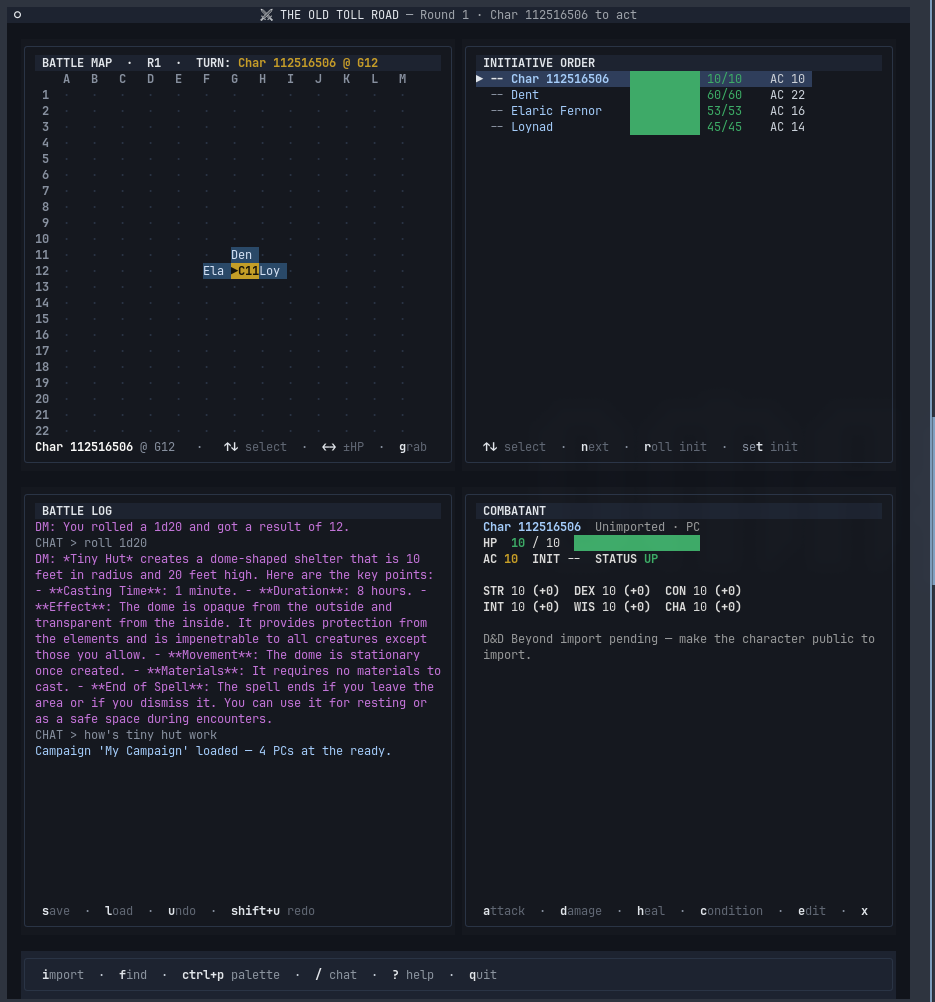
The Four-Quadrant HUD
Everything is contained in a single non-scrolling terminal layout split into four coordinated panels:
┌──────────────────────────────┬──────────────────────────────┐
│  BATTLE MAP (Grid & Tokens)  │  INITIATIVE ORDER (HP & AC)  │
├──────────────────────────────┼──────────────────────────────┤
│  BATTLE LOG & AI CHAT ( / )  │  COMBATANT DETAILS (Stats)   │
└──────────────────────────────┴──────────────────────────────┘
1. Tactical Battle Map
A clean ASCII/terminal grid (coordinates A–M, 1–22) that tracks token positions for both PCs and monsters. Pressing g grabs the active token so you can glide it across the battlefield with arrow keys and drop it into place (Esc / g).
2. Live Initiative Order
A clean vertical list of every active participant in the encounter, showing color-coded health meters, current HP / Max HP, Armor Class, and who is on deck. A quick tap of n or Enter advances the turn instantly.
3. Combatant Detail Card
Select any creature (k / j or ↑ / ↓) to immediately inspect their full ability scores (STR, DEX, CON, INT, WIS, CHA), modifiers, condition immunities, and active status tags.
- Direct D&D Beyond Character Import (
i): Pulls live PC stats directly via character URL. - One-key combat actions:
ato attack,dto apply damage,hto heal, andcto toggle status conditions (Poisoned, Stunned, Prone, etc.).
4. Battle Log & On-The-Fly AI Assistant
The bottom-left pane tracks combat actions and dice rolls (roll 1d20), but it also houses an integrated OpenAI copilot invoked with /.
Because the AI is injected with the active encounter context (including whether you are running the 2014 or 2024 ruleset from campaigns.json), you get immediate, authoritative rulings without flipping pages or diving down search engine rabbit holes mid-combat.
Keyboard-First Workflow
The entire app is tuned for keyboard muscle memory so your hands never have to reach for a trackpad:
| Key | Action |
|---|---|
↑ / ↓ (k / j) | Select previous / next creature |
← / → | Adjust HP (-1 / +1) |
g | Grab token (arrows to move, g/Esc to drop) |
n / Enter | Next turn in initiative |
a | Execute attack (weapon / spell → target) |
d / h | Prompt damage or healing amount |
c | Toggle conditions (Blinded, Restrained, etc.) |
m / b | Add monster / browse SRD monster library |
v | Browse spellbook and attach spells to creatures |
i | Import PC from D&D Beyond |
/ | Ask OpenAI assistant with encounter context |
Why Textual & Terminal UIs Shine Here
Building this in Python with Textual made it possible to combine reactive UI components, CSS-like styling in terminal space, and instant response times with zero overhead.
It boots in milliseconds, runs over an SSH session or local shell window, and gives you all the power of a modern digital assistant while preserving the intimate, pen-and-paper feel of in-person tabletop gaming.
Check out the repo on GitHub: interurban/DMTui.